Showing posts with label Reliance Jio. Show all posts

Tuesday, September 13, 2016

How To Generate Barcode For Jio Sim With Bluestacks Player

Reliance Jio Sim has now become the trending craze for all the Internet users. They're eagerly waiting to Get Jio sim somehow whether standing in the whole long queue at the outside of Reliance Digital Xpress Store or getting it from retailers by managing some extra bucks. Still there are some users who are unable to generate barcode for Jio Sim in order to get Reliance Jio sim. In this way they're trying to buy barcode from someone else who are making them fool by taking their money. So we are here to help those guys who are unable to generate barcode for Jio sim. We are going to take the help of  Bluestacks Player Emulator to generate barcode. Follow the below steps carefully.

I have already posted this trick on one of my blog. But as you all know that there are lots of Bloggers who are keeping their eyes on other tutorials to copy it for their blog in order to make their blog to get notice by new users. But they don't know that Google is smart enough to find the duplicate content by their algorithms. So let it be make them a post by copying it from other blogs. I am not going to make any issue on it over here by raising this point. But at least they should have some dignity by giving the credit to real content writer. However, follow the below steps carefully to generate barcode for Jio sim.

How To Generate Barcode For Jio Sim With Bluestacks Player

How To Generate Barcode For Jio Sim With Bluestacks

1.First off Install Bluestacks Emulator in Your Pc.
2.Now after that Install Xposed Installer.
3.Now installing Xposed installer install IMEI App.
4.After this Change your IMEI with any 4G Device by IMEI App. ( Like Samsung, Lyf, Yureka Etc.)
5.Now after this Install My Jio App  Download My Jio Apk (Use this Version Only).
6.Now Install all the Apps Which is listed on My Jio Apps.
7.After this Turn Off Your Internet Connection and Open My Jio App.
8.You'll see the Option of Get Jio Sim Option there.Now turn on your Internet Option and Click on it.
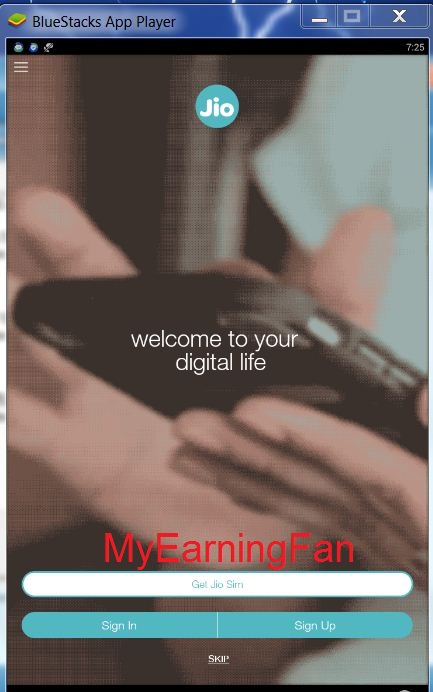
Jio Sim Barcode MyEarningFan

9.Wait for few seconds you'll see Jio Preview Offer Offer details.

Jio Sim Barcode

10.Click on Agree and Get Jio Offer.
11.On the next page you'll see Eligibility Check. Enter your State and City Details.

Jio Sim Barcode

12.After that Click on Next button and Generate Your Offer Code.

Jio Sim Barcode

Some Important Points To Keep in Mind After Generating Barcode 

After generating Barcode for Jio sim with Bluestacks make sure that you have noticed the IMEI number of your Bluestacks and keep it somewhere. Because you may need this IMEI number later in order to activate your Jio Sim. So it is an Important point to keep it in your mind.

This tutorial is for educational purpose only. So don't try to misuse it for making it illegal by selling barcode to others.

If you don't have Bluestacks then you can use any 3G phone to generate Jio Sim Barcode by using the same method which we have mentioned above. 

Ending Essence !!

So follow the steps carefully to generate Jio sim barcode in order to get Reliance Jio Sim. We are posting trick for educational purpose only. So don't misuse it. If you are unable to generate barcode in your phone then you can take the help of this tutorial by using your IMEI number.

Incoming Searches:-

Saturday, September 10, 2016

How To Use Unlimited Data In Reliance Jio After the Exhaustion of 4GB/Day Limit ( Change Welcome to Preview Offer)

Reliance Jio is a hot and trending topic now days for everyone because of its remarkable step of providing the unlimited usage of data and calling features. If you are searching the topic how to use unlimited data in Reliance Jio After Exhaustion of 4GB per day limit then you are at right place. You can convert back your Welcome offer to Preview offer by using following tricks. As we all know that Reliance has become one of the best choice for youngsters to fulfill their dream of using unlimited data because of  not paying extra bucks to other telecom data plans. But after the announcement of Reliance Inc that they are going to give Welcome offer to all the new users who are having 4G handsets. So in this welcome offer they have introduced that their users can use only 4G data limit per day after that they can use it with 128KBps speed.

How To Use Unlimited Data In Reliance Jio After the Exhaustion of 4GB/Day Limit ( Change Welcome to Preview Offer)

After getting the Welcome offer some of you have been thinking that what we'll do after using 4GB data per day limit ? Can't we use unlimited data beyond this limit of 4GB ? So don't disheartened yourself we are going to tell you that how you can use Unlimited data after the usage of 4GB/day limit without any speed cap. If you have not updated your My Jio app then you can use Preview offer which is giving Unlimited data usage without any 4GB/day limit restrictions. So if you haven't updated your Jio app then you are lucky though that you are not going to face any limit restrictions.

How To Use Unlimited Data In Jio Sim After 4GB Per Day Limit ?

For this if some how you have updated your My Jio app then first you have to downgrade your My Jio app with the provided version of My Jio app. But before doing this first make sure that you have used your 2GB data usage after using your 2GB see whether you have got your Unlimited Data Preview offer or not ? If not then follow the below steps.
1.First of all uninstall your Updated version of My Jio App.
2.After that download this version of My Jio App ( Must use this version)
3.Now after installing this My Jio app turn off your Internet Data connection.
4.Open My Jio App you'll get the option of Get Jio Sim.
5.Now Click on Get Jio Sim option by enabling your Internet Connection ON.
6.You'll get message of "Congratulations ! You have activated your Jio preview offer"

Reliance Jio Unlimited Data Usage

7.Now go on back option and click on Sign up or Sign in you'll be automatically login to your Jio account.
Unlimited reliance Jio data

8.Done !! Now you'll be able to use unlimited data after getting back to the preview offer.

Some Important things to Notice:-

Before using the above trick make sure that you have already used your 2GB data in your Jio sim and after that you didn't see any message of complimentary unlimited access then remove your Jio sim and after that insert it back after two days and see whether you have got that option or not. If not then follow the above trick to make your Reliance Jio sim data unlimited. You can also resolve your speed capping issue by using the above trick.

Glance at Vpn Trick to Increase Downloading Speed in Reliacne Jio Sim

1.First of all Download Snap Vpn or Turbo Vpn or Opera Vpn.
2.As I have downloaded Snap Vpn so i am going to take the example of this vpn you can use other above mentioned Vpn apps.
3.So in Snap Vpn select the Indian Server it may take few seconds to connect. You can choose another server if you like.
4.After that when you get connected to the server resume your downloads or start browsing to get better speed.
5.So you can use this small yet powerful trick to get better speed in your Reliance Jio Sim Internet

Ending Essence !!!

So by using the above method you can get back your preview offer in Reliance Jio sim. After the exhaustion of 4GB per day limit your speed can cap but reverting back to preview offer from welcome offer you'll be able to use unlimited data usage without any capping issue.

Tuesday, September 6, 2016

Reliance Jio 4G Unlimited Data Offer : Tips For Getting Jio Sim Faster Hidden Truth

Reliance Jio is currently one of the pageantry topic among all the people whether they are tech-enthusiast or just normal people who don't give much heed to these flashing topic. But everybody is gossiping about Reliance Jio. How to get Reliance Jio Sim is one of the most incisive question for them. If you are also one of them then don't worry in this post we are going to tell you the hidden truth about how to get Jio Sim faster than ever, Hidden truth of grabbing it as soon as possible. So what is the hidden truth about this ? Is it really Unlimited ? No, this is not unlimited. After some recent update we get to know that you can use only 4GB data per day. Means you can only use 120GB data per month.

Reliance Jio Sim

But if someone using it more than 4GB per day then may be they have been using the preview offer of Jio that has been launched some month ago then it could be possible though. As we all know that without any hidden truth Reliance can't give it freely to use unlimited data. We'll see the exact data plans after the ending of its preview offer. However, if you are getting more than 120 GB per month without wasting a single dime then who doesn't want to get Reliance Jio Sim.

Tips For Getting Jio Sim Faster Hidden Truth

How about if i tell you that you can get Jio sim within 15 minutes or less ? Isn't it amazing to hear that ? But yes you can get it within 15 minutes or less. If you are tired of standing out there of Reliance Digital Store. Then you will be shocked to know that you can get your reliance Jio without wasting your time by just providing your Aadhar Card eKYC. We know that Reliance Store executives taking a long time to give a Reliance Jio sim by making you fill up your Reliance Jio sim registration form first. So let see how we can make it more faster than boring process.

How To Get Reliance Jio Sim Easily ?

1. Go to your nearest Reliance Jio Digital Store. Make sure that store are providing Jio sim through eKYC process.
2. Then after inspecting about this type of Store where they are using this process. Take your Aadhar Card and provide them your Aadhar Card number who are doing eKYC process. They'll scan your fingerprint. That's all you can do. Rest they'll do their official process later and will give you Reliance Jio sim within 15 minutes or less. You don't have to sign any paper for getting Jio sim. Just find out this type of stores who are doing eKYC process to get your Jio sim instantly. 

Final Words !!!

So this was the hidden truth about getting Jio Sim faster than ever with easy method of eKYC process. By just giving Aadhar card number and Fingerprint to their scanner. And get your Jio sim less than 10 minutes. !!